Guide
Can Blurred Text in an Image Be Recovered?
People ask this because they have blurred something in a phone's markup tool and want to know if that was enough. The honest answer depends on a number nobody states — the radius of the blur relative to the height of the letters — so this page measures it: five concealment settings, one attack pipeline, and the exact strings that came back out.
What was tested, and how
Eight strings of the kind that actually appears in screenshots — a Social Security number, a card number, a mobile number, an email address, a name, a street address, a PIN, an IBAN — were rendered with the same font at a fixed pixel height, then obscured five ways: a solid black fill, a solid white fill, pixelation at 4, 8 and 16-pixel blocks, and Gaussian blur at radii 1 to 8 pixels. Every obscured image then went through one shared attack: contrast stretch to full range, 4x bicubic upscale, unsharp mask, Richardson-Lucy deconvolution against a Gaussian point-spread function, then OCR in single-line mode. Each method was treated identically, so the comparison is between concealment methods and not between attack pipelines.
A second attack ran alongside it: template matching, which renders every candidate character, degrades it the same way, and asks which glyph would look like this pixel patch afterwards. That is the attack that threatens small pixelation, and it assumes the attacker knows the font and the block size.
Two things to keep in mind while reading the numbers. The samples are clean synthetic renders on a plain background, which is the easiest case for an attacker — real screenshots arrive with compression artifacts, subpixel rendering and coloured backgrounds. And OCR is one reader: a person willing to squint at an upscaled image can sometimes read what a machine cannot, and the reverse is also true.
The results: light blur is not concealment
At a glyph height of about 26 pixels — roughly 11pt text in a phone screenshot at device scale — a Gaussian blur of radius 2 was read back correctly 7 times out of 8, with a character error rate of 0.03. That is not 'partially recovered'. That is the Social Security number, the card number and the email address coming back intact, in one pass, with software that fits in a laptop.
Radius 1 was worse still: five of five strings recovered at every text height tested, including 14-pixel text. A blur so light it looks like a softening filter leaves the content completely readable to a machine.
Radius 3 recovered one of eight at 26 pixels, radius 4 none, radius 8 none. So there is a threshold between 'not concealment' and 'not recoverable by this pipeline' — and it sits at a radius that is comparable to the height of the letters themselves. That is the number that matters, and it is why the size of the text is half the answer: the same radius 4 blur that fails at 26 pixels recovered three of five strings at 36 pixels and four of five at 48 pixels. Larger letters survive a fixed blur because more detail fits inside the surviving smudge.
Solid fills recovered nothing at any size: zero of eight for black, zero of eight for white, character error rate around 0.96 to 0.99. What OCR reported on those images was noise on a blank rectangle — strings like 'Ete = = AF td' — which is the signature of a reader inventing text where none was written rather than of text being hard to read. The pixels inside a solid fill hold one constant value; there is no glyph left to invert.
Pixelation at 4, 8 and 16 pixels recovered zero of eight through the OCR path at 26-pixel text. The template-matching attack also returned nothing — see the caveat below before treating that as a result.
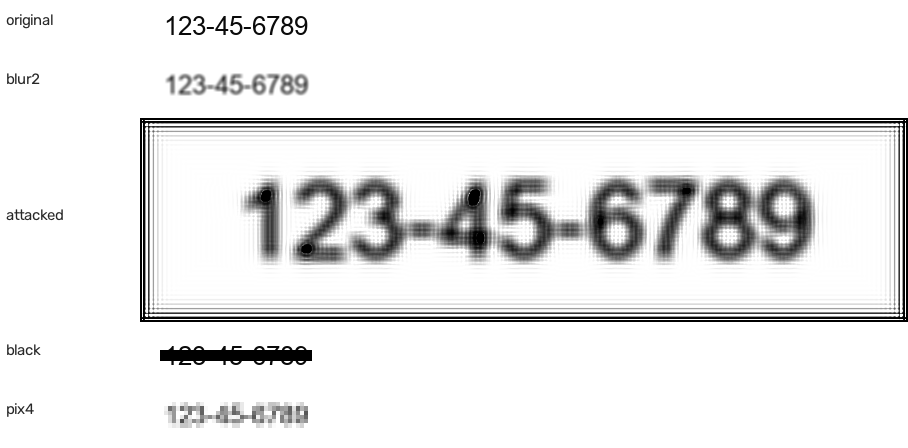
The measurement that argues against pixelation, not for it
At 48-pixel text, pixelation with 4-pixel blocks was read back correctly two times out of five. That is the one result in this page that cuts against the tool's own options, and it is worth stating plainly rather than burying: pixelation is not uniformly strong. Its strength scales with the ratio of block size to letter height. Four-pixel blocks on a 48-pixel letter leaves 12 blocks across the height of a glyph, which is enough for a machine to pick out an 8 from a 3.
The practical rule follows from the ratio, not the method: coarse blocks over small text are strong; fine blocks over large text are a soft blur with extra steps. If a document has big display type in it, a solid fill is the setting to use.
The template-matching numbers should not be read as 'pixelation defeats template attacks'. The matcher implemented here segments the line by finding columns of dark pixels and compares a 48x48 thumbnail of each patch. On a pixelated image, adjacent blocks blur that segmentation, and it produced a character error rate near 0.94 on every method including the ones OCR could read — which tells you the matcher failed at the segmentation step, not that the pixelation held. Depixelisation is a real research area with stronger tools than the one written for this page. Treat the pixelation results as 'this attack pipeline did not break it' and use a solid fill when the value matters.
Sending it through a chat app does not help you
There is a reasonable-sounding idea that the compression a messenger applies on the way out finishes the job the blur started: the file gets downscaled and JPEG-encoded, so whatever faint detail was left should be ground away. It was measured, and it is wrong. The same eight strings were covered, then re-encoded with the shape of a chat app's treatment — longest edge scaled to 1600 pixels, JPEG quality 70 — and the same attack run on the received file.
Radius-2 blur: 7 of 8 recovered before the hop, and 7 of 8 recovered after it. Not one string became safer. The one that still failed, the IBAN, came back with an extra space in it — `IBAN GB82WEST 12345698765432` — which a reader can read as well as the original.
The reason is worth understanding, because it predicts the next case. The detail that survives a light blur is low-amplitude but high-contrast at the stroke edges, and JPEG at quality 70 on a mostly white document preserves exactly that: flat areas cost it nothing to encode, and a text region is close to a two-tone image. Compression destroys the parts of a photograph an attacker was never using. Pixelation and solid fills came back 0 of 8 in both conditions — for them the hop is irrelevant because there was nothing to preserve.
The practical form of this: the copy your recipient can open is not safer than the file you made. If the cover was weak before you pressed send, it is weak afterwards, and re-sharing a compressed version of the same mistake adds only delay.
Run it on your own file
The experiment above uses synthetic renders because that is the only way to hold every variable still and compare methods. It is not the file you are worried about. The second script in the repository, `scripts/redaction-inspect.py`, takes any image you point at it and answers the only question you actually have about your own.
It reports the file's format, dimensions, colour mode and frame count, whether an alpha channel exists and how many pixels in it are not fully opaque, then looks for uniform rectangular regions and classifies each one as a solid fill, a partially flat block or a region where detail survives. With `--attack` it also runs the full attack over the whole picture and prints what the machine can read. That last line is the one to look at.
The distinction it is built to catch is the one that hurts: a cover drawn with transparency over text. It looks correct in the preview, the pixels underneath are still in the file, and the transparency check calls it out immediately. A flattened solid rectangle reports purity 1.000 with a value spread of zero and its attack line returns noise; a light blur reports no uniform region at all and its whole-image attack returns the string — on the test file, `123-45-6789`, read straight back.
Its limits are as important as its output. It inspects one raster file. A PDF can carry the original text and image objects under a drawn rectangle no matter how opaque the rectangle looks on screen, and nothing here opens the PDF's object list to check; a Live Photo, a burst, a HEIC sequence or the original file still sitting in the camera roll are all outside what a single-image checker can tell you. Where the document came from a real redaction pipeline — a PDF, a court filing, a hospital record — the verification has to happen in that format, not in a screenshot of it.
So what should someone actually do
For any value that must not survive — an identity number, a card, an account reference, a name — use a solid fill. It is the only setting tested that produced no partial information: no glyph shape, no stroke count, no character length. Everything else in the test leaked something, including pixelation at the wrong block size.
If a blur or a light mosaic is already on the image and it is being shared, the answer from these numbers is that a motivated reader with a laptop can plausibly get the text back at the radii consumer tools default to. The fix is not a stronger blur, it is a fill.
And cover a little wider than the value. The failure mode with a fill is not the algorithm, it is the box: the last digit left outside the edge of the rectangle is a perfectly readable last digit, and at the size a phone screenshot is normally viewed, that edge is hard to see.
Reproduce it yourself
Two scripts are in the repository and neither has unusual dependencies: OpenCV, Pillow and a tesseract binary on the PATH. `python scripts/deblur-experiment.py` runs the whole comparison and prints three things — the per-method table including the chat-app column, the glyph-height sweep, and a count of how many of the eight strings came back — then writes results.json, size-sweep.json and the covered crops it tested into a temporary directory. `python scripts/redaction-inspect.py <file> --attack` runs the same attack on a file you choose.
Changing the strings, the font or the heights is the point of having the code rather than the table. A result that only describes synthetic 26-pixel Arial is not worth a page of reading, and the two cases where this experiment is weakest are exactly the two you can test for yourself: run it on the compressed file your messenger actually delivered rather than the one the tool exported, and run the inspector on the screenshot your phone's own markup made, because those are the images people share and the ones nobody measures.
Since the strongest result in this test came from the one option that overwrites pixels instead of degrading them, the practical conclusion is to redact image online with a solid fill rather than reaching for a blur radius and hoping it is large enough.
Frequently asked questions
Can you Unblur an Image, Then Read the Text?
At small blur radii, yes, in this test. Radius 1 came back 5 of 5 at every text height and radius 2 came back 7 of 8 at 26-pixel text, using a contrast stretch, a 4x upscale, unsharp masking, Richardson-Lucy deconvolution and OCR. That is why a light blur is a design choice and not a privacy control.
Is Pixelation Safer Than Blur?
In this run, at the sizes where it mattered, yes: zero of eight recovered through OCR at 4, 8 and 16-pixel blocks on 26-pixel text, where the equivalent blur was read back. But the ratio decides it — the same 4-pixel blocks over 48-pixel text gave up 2 of 5. A solid fill is the option that does not depend on getting a ratio right.
Does Making the Blur Stronger Fix It?
Partly, and the threshold is not where people expect. Radius 4 and 8 defeated this pipeline at 26-pixel text, but radius 4 recovered 4 of 5 at 48-pixel text. Because it depends on letter height, blur cannot be the control you rely on for a value that must not come back.
Can AI Recover Blurred Text Better Than This?
Almost certainly, and this page deliberately does not measure it. Generative restoration models reconstruct plausible text where the pixels are ambiguous, which makes them good at exactly the task this test declares out of scope. The absence of an AI attack is a limitation of the experiment, not evidence that a strong blur is safe. A fill has nothing for a model to work from.
Does Sending a Blurred Screenshot Through a Chat App Make It Safe?
No. The same eight strings were measured before and after a messenger-shaped re-encode (longest edge 1600 px, JPEG quality 70) and the result was 7 of 8 recovered in both conditions. Compression is not a concealment layer, it is a delivery loss, and on a mostly white document with dark text it costs the attacker almost nothing.
How Do I Check a File I Already Sent or About to Send?
Run `python scripts/redaction-inspect.py your-image.png --attack` on it. It reports whether a cover is a solid fill or a region that still holds detail, flags non-opaque pixels, and prints whatever OCR can read from the whole picture. It reads one raster file, so a PDF's own objects and the original still sitting in your camera roll are outside what it can tell you.
Why Does Text Size Change the Answer So Much?
Because the attack is a resolution problem and blur destroys resolution in absolute pixels, not in proportion to the letters. A 4-pixel blur across a 14-pixel letter collapses most of the stroke; the same blur across a 48-pixel letter leaves the middle of every stroke untouched.
Is a Black Rectangle Enough by Itself?
The fill is the right operation; the risk moves to the edges. Cover the whole value with margin, then check the export at full zoom rather than at the size it appears in the editor, and remember the fill only touches the pixels inside the region you covered — the original file, any copy of it, and any metadata still hold what they hold.